
How to Reduce AI Costs: 7 Ways to Cut Your AI Spending Before It Doubles
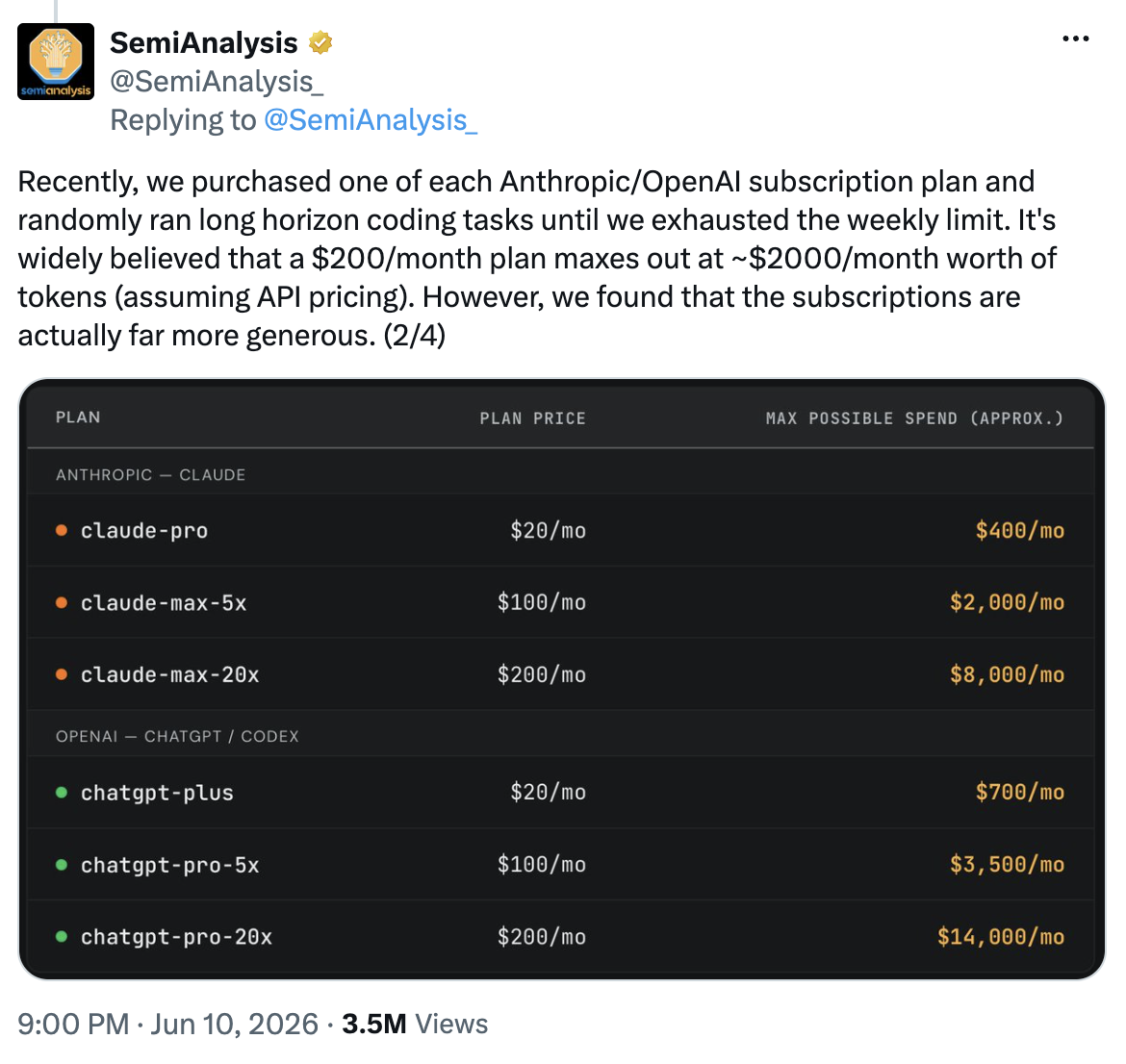
Hold me to this prediction: in 18 months, your AI budget for every AI product you use will double. At least. If you want to stay ahead of that, the time to reduce your AI costs is now, while it's a planning decision and not a panic.
I'm not writing that for shock value. The pricing we've all gotten comfortable with was never built to hold, and the numbers behind it are finally out in the open. Below is what's driving the increase, and seven concrete ways to cut your AI spending without giving up the quality you depend on.
Why AI costs are about to climb, even as prices fall
SemiAnalysis bought every subscription tier from OpenAI and Anthropic and pushed each one to its weekly limit with real coding and agent tasks. A $200 ChatGPT Pro plan, used to its ceiling, would cost OpenAI as much as $14,000 in equivalent API pricing. Claude's $200 Max plan tops out around $8,000. Per that same analysis, OpenAI starts losing money once a Plus subscriber uses a little over 11% of what they paid for, and Anthropic crosses that line near 20%.
Sit with that for a second. These plans only make money because almost nobody fully uses what they bought. Flat-rate "unlimited" AI was a customer-acquisition subsidy dressed up as a price, and it can't survive the way we're starting to actually use these tools.
Here's the part that catches teams off guard. Yesterday's frontier does get cheaper over time. SemiAnalysis expects models around today's Opus 4.8 level to eventually run profitably at about $20 a month. But staying at the true frontier of performance stays expensive, and that capability is drifting back behind metered APIs instead of flat subscriptions. So even as the price per token falls, your total bill climbs, because you'll be doing far more work with far hungrier tools, and your expectations of what these systems should handle climb right alongside. That's the squeeze, and it's why cutting AI costs has stopped being optional.
Where your AI spending actually goes
You can't reduce a bill you don't understand. Almost all of your AI cost comes from three places.
Model choice. A top frontier model can cost many times more than a smaller one for the exact same task. Calling your most expensive model for simple work is the single most common source of wasted AI spend.
Token volume. You pay per token going in and per token coming out, and output tokens cost more. Anthropic's Opus 4.8, for example, runs $5 per million input tokens and $25 per million output tokens, so the words the model writes back cost five times what your prompt does. Long prompts, bloated context, and verbose answers all add up.
Request volume and agents. High-frequency workloads multiply every per-request cost. The big one here is agentic systems, the kind that plan and run tasks on their own for hours. They can burn up to 1,000 times more tokens than a single prompt. One company reportedly spent $500 million on Claude in a single month because nobody capped employee access.
7 ways to reduce your AI costs
1. Route each task to the right-sized model
This is the highest-impact move on the list. Most of your work does not need your most expensive model. As Columbia's Vishal Misra put it, "You don't need a model that knows quantum gravity." Send simple, high-volume work to cheaper models, and reserve frontier models for the hard problems that actually need them. Companies that route this way are cutting costs by up to 95%, according to the Wall Street Journal.
2. Tighten your prompts
Since you pay per token, every unnecessary word in your prompt and every unnecessarily long answer costs money. Trim repeated boilerplate and stale context out of your prompts, and ask for concise, formatted answers when you don't need an essay. Because output tokens cost several times more than input tokens, spending a little effort to shorten responses pays back faster than almost anything else.
3. Cache repeated requests
If your system asks the same questions or re-sends the same context over and over, you're paying full price for answers you already have. Both OpenAI and Anthropic offer prompt caching that charges a fraction of the normal rate for content the model has already processed. For any workflow with recurring queries or a large fixed instruction set, caching is close to free money.
4. Batch the work that isn't urgent
Not every job needs an answer this second. OpenAI and Anthropic both offer batch processing that runs non-urgent requests at roughly half the standard price in exchange for a slower turnaround. For overnight reports, bulk document processing, and back-office tasks, batching cuts that line item in half with no change to output.
5. Set usage caps and watch your spend
You can't cut what you can't see. The $500 million Claude bill happened because nobody set a limit. Put per-team and per-project caps in place, turn on spend dashboards, and review usage on a schedule. Catching one runaway process early often saves more than every other tactic combined, and it turns a surprise invoice into a number you control.
6. Match the tool to the job
The tools that survive this shift will be the ones that do one specific thing reliably, not the ones throwing a frontier model at every task. A narrow, dependable tool built for a single job will almost always beat a general model you're paying premium rates to do the same work.
That's the bet we’re making with SquarePact: Reliable Document Intelligence. SquarePact is a Microsoft Word add-in, built by Actualization.AI and available on Microsoft AppSource, that fixes formatting inconsistencies and checks document consistency at the XML level without rewriting your content. It runs inside your own Microsoft 365 environment under a zero data retention policy, and it shows every change for your approval before applying it. Because it does one defined job instead of calling a frontier model for every task, it avoids the per-token costs that pile up when you point a general-purpose AI at routine document work. The principle holds well beyond my product: before you reach for the biggest model, ask whether a purpose-built tool already does the task for a fraction of the cost.
7. Own your data and your workflow
The most durable savings come from owning the parts nobody can charge you per token for. Some companies are moving routine traffic to cheaper open-source or fine-tuned models trained on their own data, and reporting savings in the millions. Your proprietary data and the workflow around it are where lasting value sits, not in raw access to a model anyone can rent.
Cutting AI costs is not free of compromise, and pretending otherwise sets you up to be disappointed. AI will make mistakes. Perfect performance might be possible, but likely not at a price you're willing to pay. Cheaper models and tighter prompts can mean the occasional worse answer, so the goal isn't the lowest possible bill, it's the lowest bill that still clears the quality bar your work actually needs. Measure quality as you cut, not after.
Start before the bill wakes you up
The companies treating AI like an all-you-can-eat buffet are going to get a bill that wakes them up. The ones treating it like a metered utility, starting today, won't flinch. Pick two tactics from this list this week, set a usage cap, and route your simple work to a cheaper model. That alone will put you ahead of most teams when the pricing shift arrives.
TL;DR
How much can you realistically reduce AI costs? Most teams find their AI spend is several times higher than it needs to be, and combining a few tactics commonly cuts it by more than half. Model routing alone has produced reported savings of up to 95% on the right workloads, according to the Wall Street Journal.
What's the easiest way to start cutting AI costs? Two things, both doable this week: route simple, high-volume tasks to a cheaper model, and set a usage cap with spend visibility so nothing runs away from you. Those two moves deliver most of the savings for the least effort.
Does using a cheaper AI model hurt quality? Not for most tasks. The trick is to match the model to the job rather than defaulting to the most powerful one. Reserve frontier models for genuinely hard problems and send routine work to smaller models, then measure quality so you keep an eye on the line where cheaper starts to cost you.
Why are AI subscription prices likely to rise? Flat-rate plans were priced on the assumption that few users would push them hard. As agentic tools multiply how many tokens each person consumes, that assumption breaks, and frontier capability is moving toward metered, per-use pricing.
Can a purpose-built tool cost less than a general AI model? Often, yes. A tool built for one job runs that job directly, without paying frontier-model rates for general intelligence you don't need. For document work in Microsoft Word, for example, SquarePact fixes formatting and checks consistency at the XML level inside your Microsoft 365 environment, rather than sending your file to an expensive general model that bills per token. Matching a narrow tool to a narrow job is one of the most overlooked ways to keep AI costs down.
What is SquarePact? SquarePact is a Microsoft Word add-in from Actualization.AI, available now on Microsoft AppSource, that fixes formatting inconsistencies, holds document structure in place, checks defined-term consistency and cross-references, and runs guided document review inside Word. It works at the XML level, so it does not break formatting the way copy-paste or general AI tools can. It runs inside your Microsoft 365 environment with a zero data retention policy, and every change is shown for your approval before it is applied.
