
The Most Dangerous Errors in a Document Don't Look Like Errors
TL;DR: A scrivener's error is a clerical mistake introduced during the drafting or copying of a document (a number transposed, a name inconsistent across sections, a date wrong by a month) that doesn't reflect what was actually written or agreed. Nothing flags as wrong. Spell check won't catch it. SquarePact's Scrivener's Error sequence scans your Word document for these patterns, suggests corrections, and won't change a word until you approve it.
There's a category of mistake that doesn't get caught by spell check, doesn't look wrong when you skim the page, and won't get flagged by your word processor's grammar tool.
The sentence may be grammatically correct. The numbers look like numbers. The document passed review. But somewhere in it, a figure is off by a zero, a date is wrong by a month, a name appears two different ways across sections, or a reference points somewhere it shouldn't.
These are scrivener's errors. They don't announce themselves. And that's what makes them dangerous, especially for AI document tools.
What Is a Scrivener's Error?
A scrivener's error is a clerical mistake in a written document that doesn't reflect the true intent or agreement of the parties involved. The term comes from the legal profession, where "scriveners" were the clerks who drafted and copied legal documents by hand. A scrivener's error was something the drafter got wrong in transcription, not something the parties disagreed on.
Today the definition still holds. A scrivener's error refers to a minor, unintentional mistake made during the writing, typing, or copying of a document. It is a clerical error that does not reflect the true intent or agreement of the parties involved, and it can typically be corrected without changing the substance of the document.
Common examples include:
A purchase price written as $100,000 when negotiations clearly established $1,000,000
A contract term listed as one year when both parties agreed to two
A party name spelled inconsistently across sections of the same document
A date referencing the wrong month or year
A cross-reference pointing to the wrong exhibit or section number
Some of these feel minor. But if they’re not caught, they can be big deals.
When a "Minor" Mistake Becomes a Major Problem
Here's what makes scrivener's errors genuinely dangerous: they don't always get corrected without a fight.
There is a legal doctrine called the doctrine of scrivener's error, which allows a court to fix an obvious clerical mistake in a contract when there's clear evidence of what the parties actually intended. The doctrine applies when the mistake is a simple clerical error or typo that does not reflect the true intention of the people who created or signed the document. To correct such an error, a court can consider evidence from outside the document itself, but only if that evidence is precise, clear, and convincing.
Sounds reassuring, right? But "precise, clear, and convincing" may be a high bar, courts don't always agree on what qualifies, and getting there may require litigation. Meanwhile, the other party may have every incentive to enforce the document as written.
In other words, the most financially significant mistakes are exactly the ones least likely to be corrected by a court without a fight. If an error leads to a dispute, parties may be forced to spend considerable time and money in court to clarify or reform the document, rather than fulfilling their contractual obligations. Beyond legal costs, there is the potential for substantial financial loss where an incorrect figure or term results in an unintended transfer of wealth or an erroneous obligation.
The straightforward fix is catching these errors before the document is signed. But it is so easy to miss scrivener’s errors, even for the most seasoned of contract experts. That’s why an extra pair of eyes is so valuable.
How SquarePact's Scrivener's Error Sequence Works
SquarePact includes a purpose-built sequence for detecting and correcting potential scrivener's errors in Microsoft Word documents. You'll find it in the Sequences tab of the SquarePact add-in (in older versions this tab may be labeled "Checklist").
Here's how to run it:
Step 1: Open your document and activate the SquarePact add-in. With your document open in Microsoft Word, open the SquarePact add-in from the Word ribbon. If you haven't installed it yet, it's available on Microsoft AppSource by searching "SquarePact."
Step 2: Go to the Sequences tab. In the SquarePact panel, click the Sequences tab. If you're on an older version of SquarePact, this tab may be labeled "Checklist" instead. The functionality is the same either way.
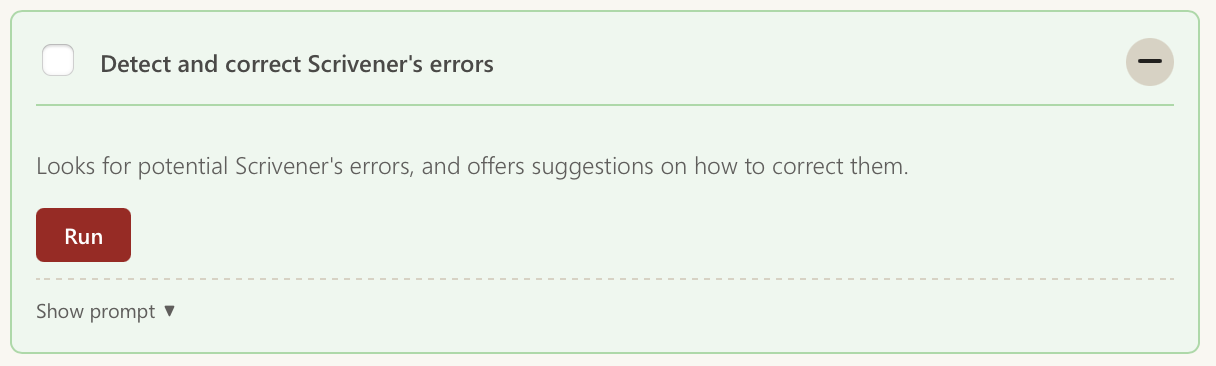
Step 3: Find and select the Scrivener's Error sequence. In the Sequences tab, you'll see a list of available sequences. Look for "Detect and correct Scrivener's errors" and select it. You'll see a brief description of what the sequence does before you run it.
Step 4: Click Run. Once the sequence is selected, click the “Run” button. SquarePact will begin scanning the document. Depending on the length and complexity of the document, this may take a few moments (SquarePact prioritizes accuracy and thoroughness to hallucinations).
Step 5: Review the results. When the scan completes, SquarePact presents its findings. For each potential scrivener's error it detects, you'll see the flagged text in context, an explanation of why it was flagged, and a suggested correction. Any text that SquarePact proposes changing is highlighted in yellow so you can see exactly what it's recommending.
Step 6: Approve or dismiss each suggestion. For each finding, you decide: approve the correction or dismiss it. If you approve, SquarePact applies the change. If you dismiss, nothing happens and the document stays as-is. You work through the suggestions at your own pace. There's no bulk "accept all" that bypasses your review.
Step 7: Save your document. Once you've worked through the suggestions, save your document as you normally would. SquarePact doesn't save on your behalf.
A few things worth knowing before you run it: the sequence works best on documents that are reasonably complete. Running it on an early draft where names and figures are still placeholders will produce noise. It's most useful as a final review step, after the document is substantively finished and before it goes out.
Why This Isn't Just a Spell Check
Standard spell check catches misspellings. Grammar tools catch broken syntax. Neither of them catches a number that's wrong, a date that's off, a party name that appears two different ways, or a section reference that points somewhere it shouldn't.
Catching those patterns requires understanding the document's internal logic, not just its surface text. SquarePact's sequences are built using a combination of AI approaches and purpose-built algorithms designed specifically for document analysis. This isn't a generic AI prompt fed into a large language model and hoping for the best. It’s a complex algorithmic sequence optimized to find the specific error patterns that matter in professional documents, with accuracy that a general-purpose tool can't match and at a fraction of the token cost.
Who Should Run This Sequence
SquarePact’s Scrivener's Error sequence is valuable for anyone whose work involves documents where precision matters:
Legal teams finalizing contracts before execution, where a single inconsistency can trigger a dispute
Compliance and regulatory teams working with documents that reference specific dates, figures, and defined terms that must match across sections
Procurement teams reviewing vendor agreements where price, term, and party name accuracy is non-negotiable
Finance teams preparing reports, agreements, or proposals where numerical consistency across the document is critical
Anyone doing a final review pass on any document where you need confidence that what's written matches what was agreed
If you've ever signed a document and only afterwards noticed a number was wrong, a name was inconsistent, or a reference pointed to the wrong place, this sequence is what helps you catch those things before they leave your desk.
Frequently Asked Questions
What is a scrivener's error? A scrivener's error is a clerical mistake in a written document that doesn't reflect the true intent of the parties involved. Common examples include transposed numbers, wrong dates, inconsistent party names, and broken cross-references. The term comes from legal practice, where it refers specifically to errors made during drafting or transcription rather than errors in the underlying agreement itself.
Can scrivener's errors be corrected after a document is signed? Sometimes, but not always without a dispute. The doctrine of scrivener's error allows courts to correct obvious clerical mistakes when there is clear and convincing evidence of the parties' actual intent. However, errors involving prices, dates, quantities, and legal names can be harder to reform and may be enforced as written. The simpler fix is finding them before the document is executed.
How does SquarePact detect scrivener's errors? SquarePact's Scrivener's Error sequence runs an advanced scan of your document using a combination of AI methods and purpose-built algorithms. It checks for numerical inconsistencies, date discrepancies, party name variations, broken cross-references, and other patterns associated with clerical errors. It surfaces suggested corrections for your review and does not change your document without your approval.
Is SquarePact guaranteed to catch all scrivener’s errors? No, and if any software claims to do this then consider it a huge red flag. The techniques utilized by SquarePact are on par with the state-of-the-art in what is currently possible (grounded in the ongoing academic research of SquarePact’s founders). And the current state-of-the-art is that even the best AI approaches—just like humans—may still miss things.
Does SquarePact automatically fix potential scrivener's errors? No, by design. SquarePact suggests corrections, explains why they might be errors, and presents them in an approval box. You review each suggestion, approve or dismiss it, and the document is only updated once you confirm. Nothing changes without your explicit sign-off.
Where do I find the Scrivener's Error sequence in SquarePact? Open SquarePact's add-in in Microsoft Word and go to the Sequences tab (labeled "Checklist" in older versions). Select "Detect and correct Scrivener's errors" and click Run.
Does SquarePact send my document to external servers to run this check? Not for the enterprise version. In that version, SquarePact can be configured to run entirely within your Microsoft 365 environment. Documents are never sent outside your organization, and there is no data retention policy to navigate. Even the publicly available (non-enterprise) version uses only zero-data retention (ZDR) compliant services.
SquarePact is a Microsoft Word add-in built by Actualization.AI, available on Microsoft AppSource. It operates at the XML level inside Word, preserving document integrity across all edits and checks.
