
Stop Hunting: How SquarePact's Smart Insert Places Document Elements Automatically
TL;DR: SquarePact's Smart Insert finds the correct location in your Word document for any saved element (a clause, table, boilerplate paragraph, disclaimer, or anything else), inserts it there, and highlights any text it adjusted so you can review it before approving. Your document is never changed directly; every suggestion goes through an approval step first.
Most people who spend serious time in Word have some version of the same problem.
You have a block of text you use over and over again. A standard disclaimer. A fee table. A scope-of-work paragraph. A compliance disclosure. You need to add it to a document, in the right section, formatted to match the rest of the file, with terminology that lines up with how this document defines its terms (not how the last one did).
So you find the saved version, copy it, scroll through a 40-page document hunting for the right spot, and paste it in. The formatting shifts. You fix it. Then you notice the saved text says "the Client" but this document uses "the Customer." You do a find-and-replace, hoping you caught every instance.
That process, repeated across dozens of documents, is where errors get introduced into final work. It's not carelessness. It's just a lot of small manual steps, and small manual steps produce mistakes.
What Is Smart Insert in SquarePact?
Smart Insert is a feature inside SquarePact's Library tab that handles the placement of any saved document element for you.
Here's how it works:
You open the Library tab in SquarePact (a Microsoft Word add-in available on Microsoft AppSource).
You select a saved document element: a clause, table, disclaimer, boilerplate paragraph, signature block, or anything else you've stored.
Instead of a standard insert, you choose Smart Insert.
SquarePact scans the document, identifies the most appropriate location for that element based on document structure and context, and places it there.
If any text in the element needs to match how your document defines its terms (for example, your saved paragraph says "the Client" but this document uses "the Customer"), SquarePact flags those adjustments in yellow so you can see exactly what changed.
Nothing is applied to your document until you approve it. Smart Insert always presents an edit suggestion box first.
Your document is never edited directly. You decide what goes in and what doesn't.
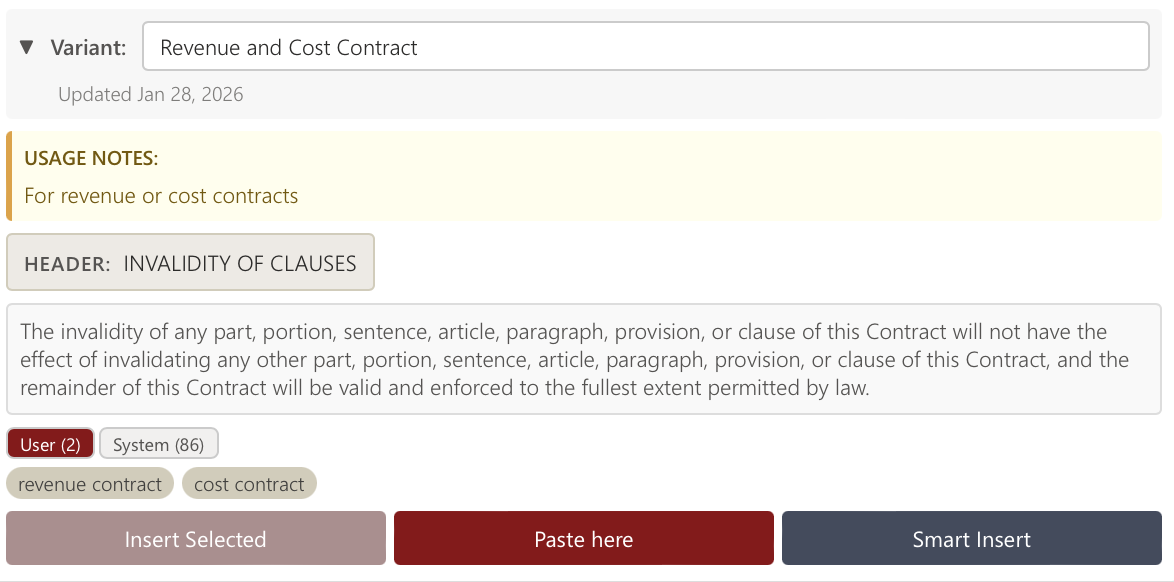
Smart Insert is available in the Library tab of SquarePact’s add-in.
What Can You Store in the Library?
The Library supports any reusable document element. Common uses include:
Standard contract clauses (indemnification, limitation of liability, governing law)
Compliance disclosures and regulatory language
Boilerplate introduction or closing paragraphs
Recurring tables: fee schedules, data fields, scope-of-work grids
Policy definitions and defined term blocks
Report sections that appear across multiple documents
Signature blocks and standard sign-off language
You can build your own library from scratch, use pre-built elements, or both. Each element lives in the Library tab and is ready to use in any document.
How Is Smart Insert Different From Copy-Paste?
Copy-paste is still available in SquarePact. It's called Simple Insert, and if you already know exactly where you want the element, that's the right tool.
Smart Insert is for when you want SquarePact to handle the judgment calls: find the right location, check for terminology mismatches, and give you a clear approval step before anything changes. It's the difference between placing the element yourself and having the tool place it correctly while you review.
The practical difference matters most in longer documents, documents built by multiple contributors, or any file where a misplaced section or a terminology mismatch creates a real problem.
Why Approval-First Matters
One of the most common objections to AI tools in professional document work is that they make changes you didn't ask for, in places you didn't notice. SquarePact is built around the opposite assumption: the tool proposes, you decide.
Smart Insert never writes directly to your document. It always surfaces a suggestion first, with adjusted text highlighted in yellow so nothing is buried. If the suggestion isn't right, you reject it and nothing changes. If it is right, one click applies it.
SquarePact also runs entirely within your Microsoft 365 environment, which matters for anyone handling sensitive documents. There's no data retention policy to worry about because the documents never leave your organization. The tool operates at the XML level inside Word, which means it doesn't damage formatting the way copy-paste or generic AI tools often do.
Who Gets the Most Out of Smart Insert
Smart Insert is useful to anyone who places the same approved content into different documents on a regular basis:
Legal and compliance teams adding clauses or required disclosures to documents where defined terms shift from one agreement to the next
Operations and finance teams dropping recurring tables, boilerplate sections, or standard sign-off language into reports and proposals
HR and policy teams keeping policy language accurate across handbooks, job descriptions, and internal documentation
Procurement and contracting teams building documents from a library of approved components
Any individual contributor who has a personal collection of reusable text and wants it placed correctly without the manual overhead
If you're regularly copying the same content into different documents and spending time fixing terminology and placement afterward, Smart Insert is what replaces that work.
Frequently Asked Questions
What is Smart Insert in SquarePact? Smart Insert is a feature in SquarePact's Library tab that finds the best location in a Word document for a saved element (a clause, table, disclaimer, boilerplate paragraph, or anything else you've stored), inserts it there, and highlights any terminology adjustments in yellow for your review. Every change requires your approval before it's applied.
Does Smart Insert edit my document without asking? No. Smart Insert always presents an edit suggestion box before making any changes. Nothing is applied to your document without your explicit approval.
How does Smart Insert handle terminology differences between documents? If a saved element uses a term that differs from how the current document defines it ("the Vendor" versus "the Supplier," for example), Smart Insert identifies the mismatch and highlights the adjusted text in yellow so you can review it before approving.
What kinds of content can I store in the SquarePact Library? The Library supports any reusable document element: clauses, compliance disclosures, boilerplate paragraphs, tables, report sections, signature blocks, defined term sections, and more. If you find yourself copying the same content into multiple documents, it belongs in the Library.
Is Smart Insert available in the free version of SquarePact? SquarePact is available on Microsoft AppSource. Visit squarepact.com for current plan details and trial options.
Does SquarePact send my document content to external servers? No. SquarePact runs entirely within your Microsoft 365 environment and has a zero data retention policy. Document content does not leave your organization.
How is Smart Insert different from Simple Insert? Simple Insert places the selected element at your cursor position, the equivalent of a clean paste. Smart Insert scans the document, determines the best location, handles terminology matching, and requires your approval before applying anything.
SquarePact is a Microsoft Word add-in built by Actualization.AI, available on Microsoft AppSource. It works at the XML level inside Word, preserving formatting integrity across edits, insertions, and collaborative document cycles.
